Triggering flows
Salesforce flows may be triggered in different ways:
-
via OneView Settings page. See Configure OneView settings.
-
via participant data using Genesys Cloud Architect. See Trigger flows via participant data.
-
via outbound campaign calling lists. See Trigger flows via outbound calling lists.
Important: Configuring more than one method to trigger the same flow may create conflicts and/or duplications. Recommend only configuring one method per flow.
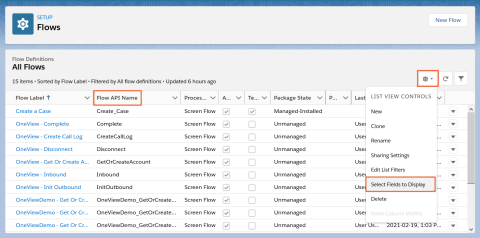
Configuration in Genesys Cloud Architect and an outbound calling list uses the API Name of the Salesforce flow. To easily locate the API Names of your flows, add the Flow API Name column to the All Flows view.