Trigger flows via participant data
Salesforce Flows can be triggered by Genesys Cloud Architect using OneView attribute keys to connect to the API names of a Salesforce flow.
For more information about Genesys Cloud Architect Flows, see https://help.mypurecloud.com/articles/architect-overview/.
- In Genesys Cloud Architect, access your designated Inbound flow.
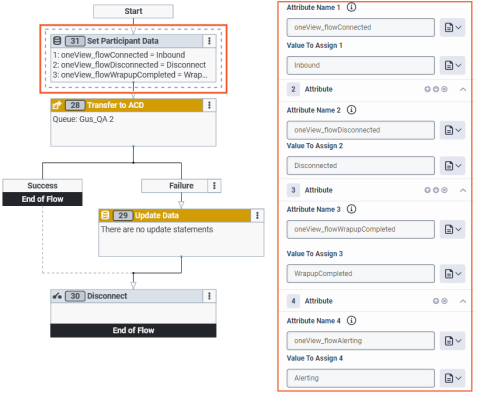
- Add a Set Participant Data block
and set three attributes as follows:
Attribute Name Value to Assign Description oneView_flowAlerting API Name of your Salesforce Alerting Flow Triggered when a inbound conversation is alerted. oneView_flowConnected
API Name of your Salesforce Inbound Flow
Triggered when a call is connected. oneView_flowDisconnected
API Name of your Salesforce On Disconnected Flow
Triggered when a conversation is disconnected/ rejected.
oneView_flowComplete
API Name of your Salesforce On Complete Flow
Triggered when ACW is completed on a conversation.
Note: Only applies to conversations with an ACW portion.
- Save your changes.